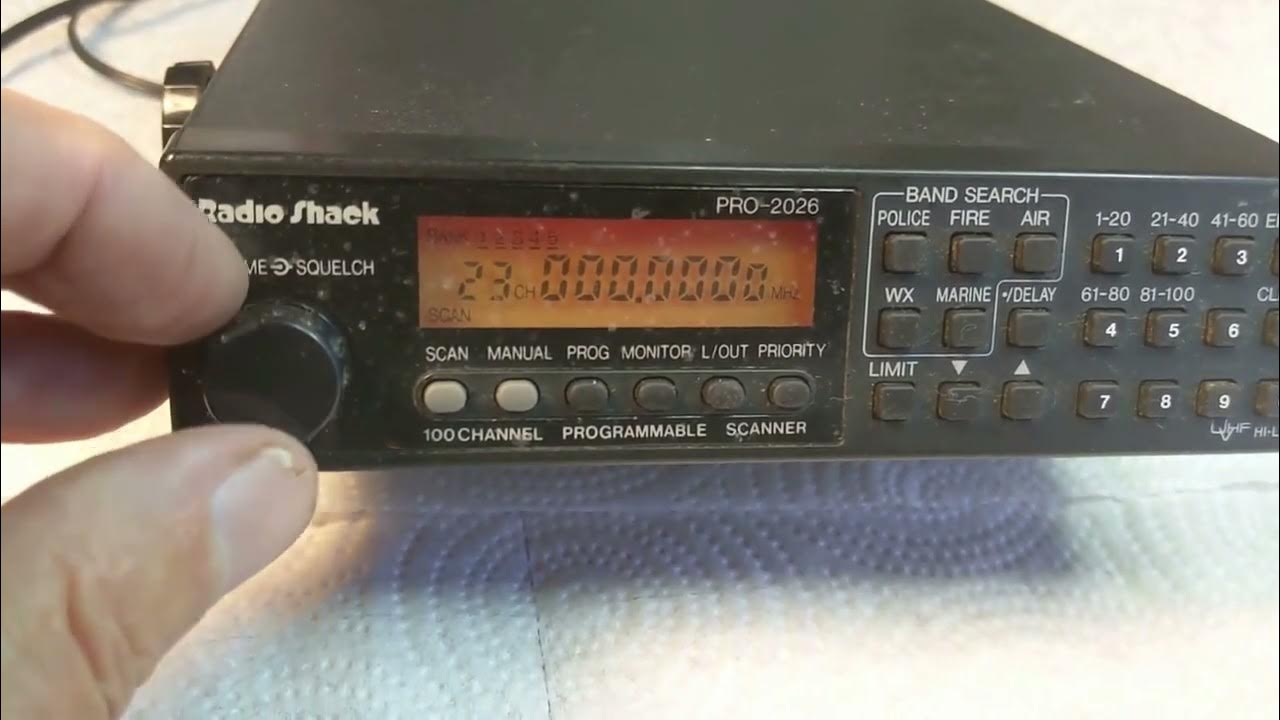
The RadioShack Pro 2096 software is an essential tool for scanner enthusiasts who want to manage, program, and customize their scanner efficiently. The RadioShack Pro 2096 digital trunking scanner remains popular among hobbyists because of its advanced monitoring capabilities and strong performance in scanning public safety, emergency, and radio communications.
Using the right software with the Pro 2096 helps users simplify frequency programming, organize channels, and improve overall scanning performance. Whether you are a beginner or an experienced radio scanner user, understanding how Pro 2096 software works can make your scanner easier to operate and more powerful.
What Is RadioShack Pro 2096 Software?
RadioShack Pro 2096 software is a computer-based programming solution used to configure and manage the RadioShack Pro 2096 digital trunking scanner.
Instead of manually entering frequencies using the scanner keypad, users can connect the device to a computer and program settings quickly.
Main Functions of the Software
- Program scanner frequencies
- Organize memory channels
- Import radio system data
- Backup scanner settings
- Edit talk groups and banks
- Improve scanning setup efficiency
The software saves time and reduces manual programming errors.
Overview of the RadioShack Pro 2096 Scanner
The RadioShack Pro 2096 is a digital trunking desktop scanner designed for monitoring multiple radio communication systems.
Key Features of the Scanner
- Digital APCO-25 support
- Multi-bank memory storage
- Trunking system tracking
- Signal scanning capability
- Wide frequency coverage
- Public safety communication monitoring
The scanner remains popular among radio hobbyists because of its reliable performance.
Why Use Software With RadioShack Pro 2096?
Programming a scanner manually can be difficult, especially for users managing hundreds of frequencies.
Benefits of Using Software
- Faster setup process
- Easier channel organization
- Better frequency management
- Simplified editing
- Reduced programming mistakes
- Easy backup creation
Software makes the scanner easier to customize and maintain.
Compatible Software for RadioShack Pro 2096
Several software programs are compatible with the RadioShack Pro 2096 scanner.
Win96 Software
Win96 is one of the most widely used software solutions for programming the Pro 2096.
Features
- Easy frequency editing
- Memory bank management
- Import and export settings
- User-friendly interface
Win96 is popular because of its compatibility and ease of use.
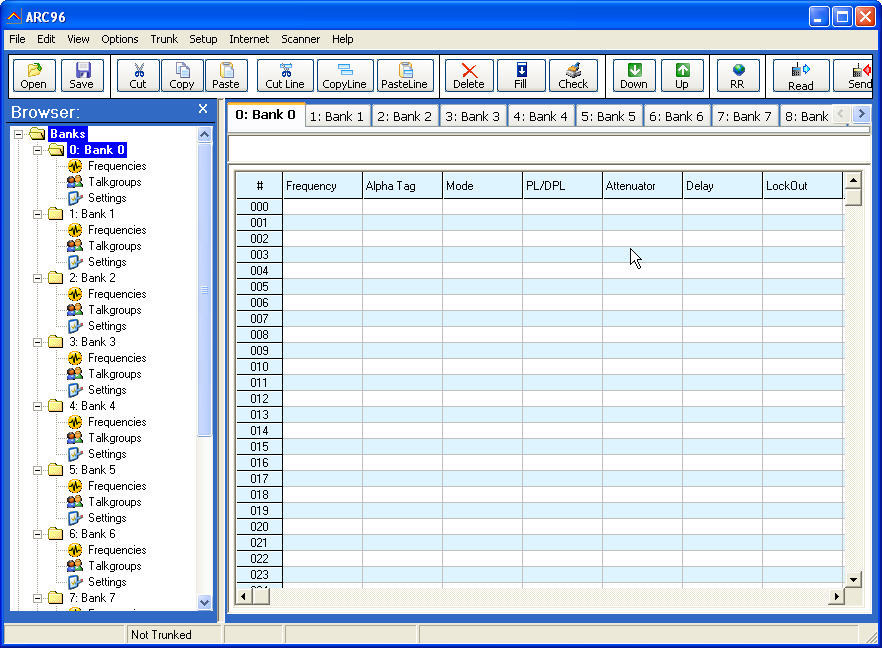
ARC96 Software
ARC96 is another programming software built for Pro 2096 users.
Advantages
- Advanced scanner control
- Data organization
- Trunking setup support
- Backup and restore functions
ARC96 provides strong scanner programming options.
Third-Party Programming Tools
Some users also utilize additional scanner utilities.
Common Uses
- Frequency database imports
- Configuration backup
- Signal monitoring adjustments
These tools improve flexibility for advanced users.
How to Download RadioShack Pro 2096 Software
Downloading the software requires selecting a compatible source.
Step 1: Identify Compatible Program
Choose software designed specifically for Pro 2096 programming.
Step 2: Visit Official Source
Access trusted download pages or authorized developer websites.
Step 3: Select Version
Download the version compatible with your operating system.
Step 4: Save Installation File
Store the installer on your computer.
Step 5: Verify Download
Ensure the file downloaded correctly before installation.
Using trusted software sources reduces security risks.
How to Install RadioShack Pro 2096 Software
Installation is usually simple.
Step 1: Open Installer
Locate the downloaded setup file.
Step 2: Accept Installation Terms
Follow the installation wizard.
Step 3: Choose Installation Location
Select the preferred folder.
Step 4: Complete Installation
Allow the program to finish installing.
Step 5: Launch Software
Open the program after installation.
Once installed, users can connect the scanner to begin programming.
Connecting RadioShack Pro 2096 to Computer
To use the software, the scanner must connect to a computer.
Required Equipment
- Programming cable
- USB adapter if needed
- Compatible drivers
- Installed software
Connection Process
- Connect programming cable to scanner
- Plug into computer USB port
- Open programming software
- Detect scanner connection
- Begin editing data
Proper connection ensures successful data transfer.
How to Program Frequencies Using Software
Programming frequencies becomes much easier through software.
Step 1: Open Programming Software
Launch your selected software.
Step 2: Read Existing Scanner Data
Import current settings from the scanner.
Step 3: Add Frequencies
Enter desired radio frequencies.
Step 4: Organize Channels
Arrange channels into banks.
Step 5: Save File
Backup programming settings.
Step 6: Upload to Scanner
Transfer the configuration back to the scanner.
This process allows quick scanner customization.
Understanding Scanner Memory Banks
The Pro 2096 organizes channels into memory banks.
What Are Memory Banks?
Memory banks help categorize frequencies.
Common Bank Examples
- Police communications
- Fire departments
- EMS frequencies
- Weather alerts
- Aviation channels
- Local government systems
Organized memory improves scanning efficiency.
Benefits of RadioShack Pro 2096 Software
Using programming software provides several advantages.
Faster Programming
Software reduces the need for manual keypad entry.
Result
Users save time while programming large channel lists.
Better Organization
Channels can be grouped logically.
Advantages
- Easier navigation
- Improved scanning performance
- Cleaner channel management
Backup Protection
Software allows saving scanner settings.
Benefits
- Restore data quickly
- Avoid losing programming work
- Create multiple configurations
Easier Editing
Users can modify settings quickly.
Examples
- Rename channels
- Change frequency order
- Update talk groups
Common Problems With Pro 2096 Software
Users may occasionally experience issues.
Scanner Not Connecting
Sometimes the scanner is not detected.
Possible Causes
- Missing drivers
- Faulty cable
- Incorrect COM port selection
Solution
Verify cable connection and update drivers.
Upload Failure
Data may not transfer correctly.
Solution
- Restart software
- Reconnect scanner
- Check communication settings
Software Compatibility Problems
Older programs may not work on modern operating systems.
Solution
Use compatibility mode or updated versions.
Driver Installation Issues
Programming cables may require drivers.
Solution
Install official drivers before connecting.
Tips for Better Scanner Programming
Programming becomes easier with proper planning.
Organize Channels Clearly
Group similar frequencies together.
Label Banks Properly
Use descriptive channel names.
Backup Frequently
Save programming files regularly.
Update Frequency Lists
Keep scanner databases current.
Test Uploaded Settings
Verify that channels scan properly.
Best Uses for RadioShack Pro 2096 Scanner
The scanner supports many listening activities.
Public Safety Monitoring
Track police, fire, and emergency communications.
Aviation Monitoring
Listen to aircraft frequencies.
Weather Alerts
Receive important weather broadcasts.
Amateur Radio Listening
Monitor ham radio traffic.
Event Monitoring
Follow local event communications.
The scanner offers flexibility for different monitoring needs.
RadioShack Pro 2096 Software vs Manual Programming
Manual programming works but requires more effort.
Manual Programming
- Slower setup
- Higher error risk
- Difficult for large lists
Software Programming
- Faster entry
- Easier management
- Better organization
- Backup support
Most users prefer software due to convenience.
Tips for Choosing Programming Software
Selecting the right software matters.
Consider Ease of Use
Choose beginner-friendly software.
Check Compatibility
Ensure support for Pro 2096.
Review Features
Look for backup and editing tools.
Evaluate Updates
Choose software with active support.
Compare Interface Design
Simple layouts improve usability.
Future of Scanner Programming Software
Scanner software continues to evolve.
Future Trends
- Cloud-based frequency storage
- Easier imports from databases
- Improved interface design
- Faster device syncing
- Better compatibility with modern systems
These improvements will simplify scanner programming further.
Why Scanner Enthusiasts Still Use Pro 2096
Despite newer models, many users continue using the Pro 2096.
Reasons for Popularity
- Reliable performance
- Strong signal reception
- Digital trunking support
- Easy software compatibility
- Affordable second-hand availability
The Pro 2096 remains useful for hobbyists and monitoring enthusiasts.
Best Practices for Long-Term Use
Maintaining the scanner ensures better performance.
Keep Software Updated
Use the latest compatible versions.
Protect Programming Files
Store backups safely.
Maintain Clean Connections
Keep cables and ports clean.
Organize Scanner Banks
Simplify future editing.
Monitor Firmware Compatibility
Ensure stable communication between software and scanner.
FAQ’s
What software works with RadioShack Pro 2096?
Popular software options include Win96 and ARC96, both designed for programming the Pro 2096 scanner.
Can I program the RadioShack Pro 2096 without software?
Yes, manual programming is possible, but software makes the process faster and easier.
How do I connect RadioShack Pro 2096 to a computer?
You need a compatible programming cable and installed drivers to connect the scanner to your computer.
Is RadioShack Pro 2096 a digital scanner?
Yes, the Pro 2096 supports APCO-25 digital trunking systems.
Why is my Pro 2096 software not detecting the scanner?
This may happen due to missing drivers, incorrect COM port settings, or cable connection issues.
Conclusion
The RadioShack Pro 2096 software makes scanner programming easier, faster, and more organized. Whether you use Win96, ARC96, or another compatible solution, software improves how you manage frequencies and customize your scanner. By understanding installation, programming, troubleshooting, and best practices, users can maximize the performance of the RadioShack Pro 2096. Proper setup ensures smoother scanning, better organization, and a more enjoyable radio monitoring experience.